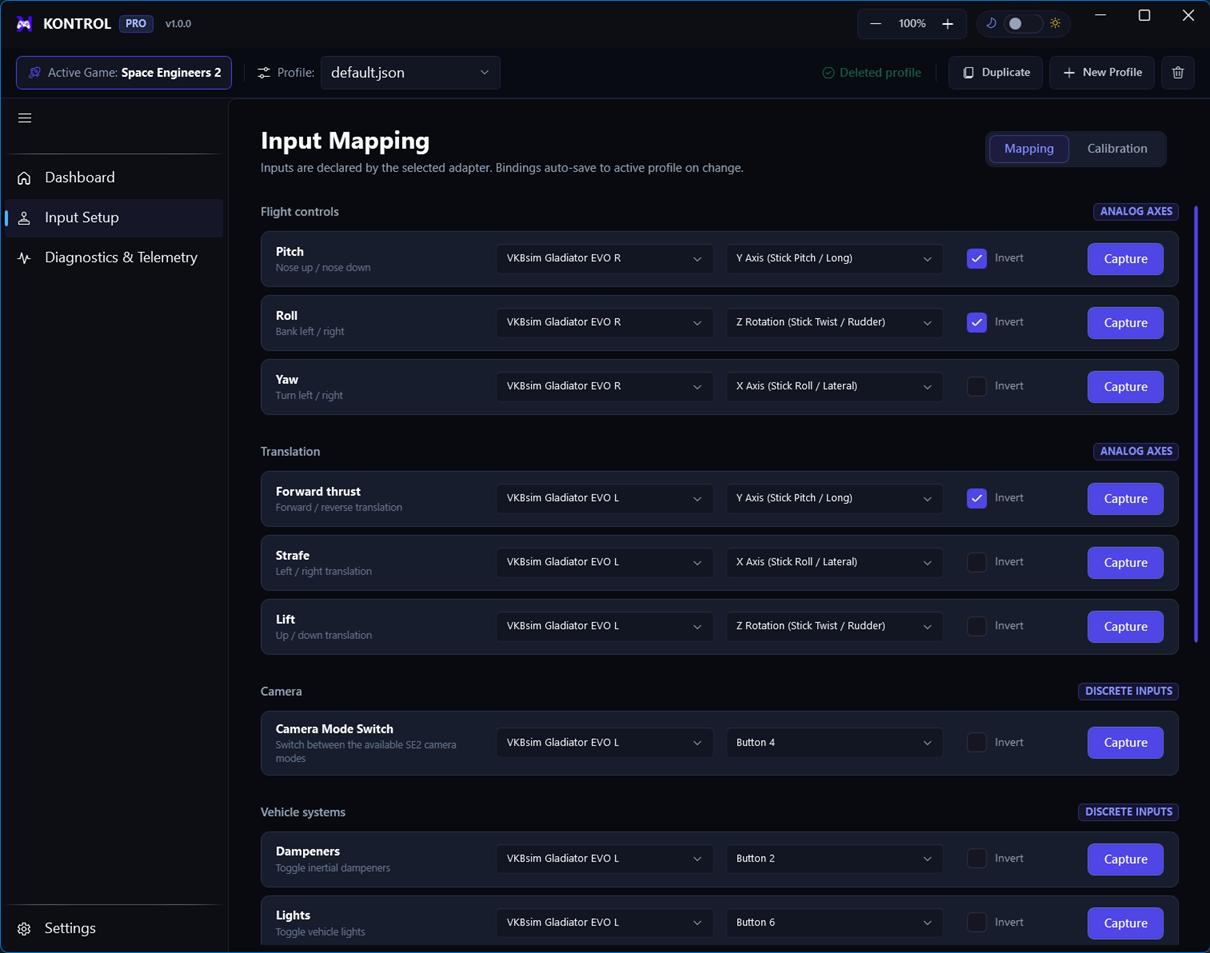
06 / MAPPING
Map controls from action details
You can bind controls without physically moving the stick: choose the device and input directly from each action’s detail controls.
Binding procedure
- Open Input Setup → MappingFind the action using the search box or category filters.
- Open its detailsExpand the action details drawer.
- Choose ControllerSelect the exact hardware device from the controller combobox.
- Choose Input Source ModeUse the mode appropriate to the control, such as an axis or discrete button.
- Choose Axis or ButtonSelect the named axis/button from the corresponding combobox.
- Set directionFor reversed hardware behavior, enable Invert Axis in the action details.
- VerifyConfirm the binding summary and test it in Send Inputs Live.
Example VKB HOSAS bindings
ActionControllerInputDirection
PitchVKBsim Gladiator EVO RY Axis (Stick Pitch / Long)Normal
RollVKBsim Gladiator EVO RZ Rotation (Stick Twist / Rudder)Invert Axis: On
Inertia dampenersVKBsim Gladiator EVO LButton 2Normal
Invert Axis
Invert is an action-level setting. Apply it to the action whose direction is opposite to your intended control response, then retest the live output.